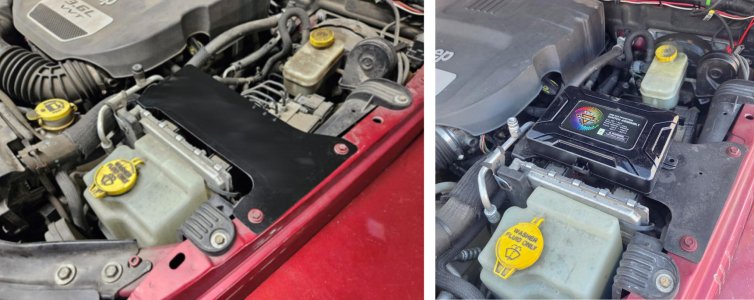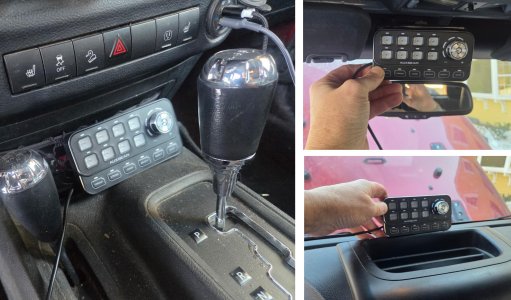

jscherb
Expedition Leader
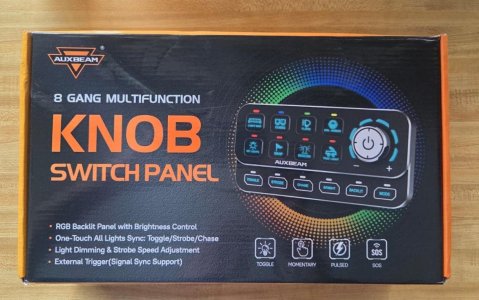
Auxbeam's new "Knob Switch Panel" is an 8-circuit unit with some groundbreaking features, including the ability to dim lights controlled by it, various "bling" options such as chase lights and strobe lighting. There are also external trigger inputs and can turn on a circuit when some other circuit turns on, for example you can connect a trigger to a the brake light circuit in the vehicle and when the brake lights are activated the system will activate one of its circuits - useful if you want to have extra strobed brake lights that nobody can miss.
What's in the box
The contents of the kit are very well thought out and almost everything you need is included (more on what else you might need later).
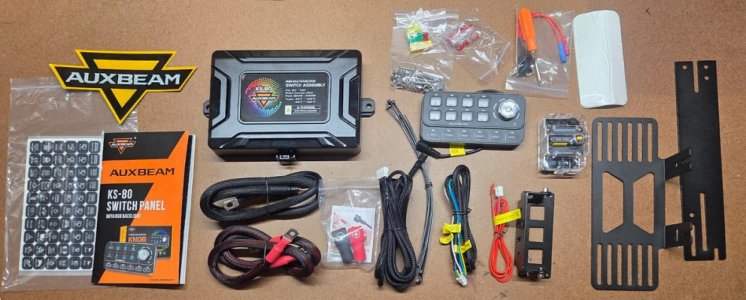
Left to right in the photo above:
- Switch labels and a comprehensive 26-page instruction book
- The control box and heavy power cables to connect the box to the battery
- Cables to connect the switch panel to the control box and other necessary connections
- The rotary knob switch panel, and above it various mounting hardware
- A 100-amp circuit breaker for the main power connection and a fuse tap for connecting to ACC power
- Mounting brackets for the control box and the switch panel, and double-sided adhesive if you want to stick the switch panel in place.
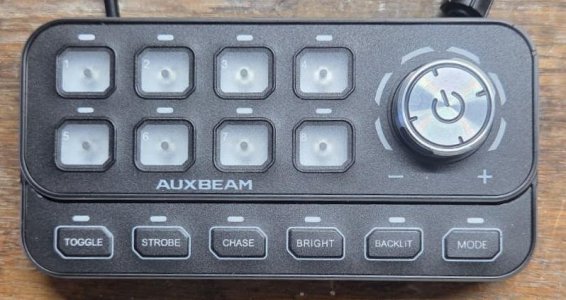
The switch panel has buttons for 8 circuits (and 160 stickers to label the buttons although none are installed in the photo below), a rotary control for adjusting brightness of the backlight, of the attached light accessories, color of the backlight, speed of the lighting effects and more.
The functions of the row of buttons at the bottom include:
- Toggle
- Strobe
- Chase
- Bright
- Backlit
- Mode
More on how these functions work later.
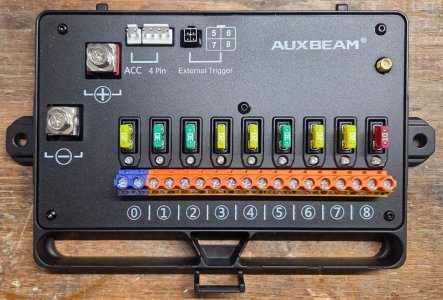
The control box actually has 9 circuits, 8 of which are controlled by the 8 switches on the control panel and one (circuit 0) automatically comes on when ACC power is applied to the control box (in other words, when the ignition is switched on). This serves as an additional source of switched power in the vehicle, eliminating the need to tap into the fuse panel if you have a need for switched power. As one example, the manual points out that circuit zero could be used to turn on daytime running lights.
Fuses are provided for each circuit, as well as an LED for each circuit, visible just below each fuse, which will light if a fuse blows.
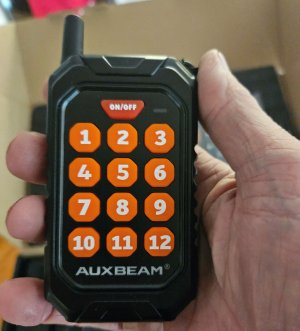
Connections include large screw terminals for the main power and ground connections to the battery. ACC gets connected to switched power to turn on the system when the ignition is switched on. The 4-pin is where the switch panel connects and the external triggers are used to turn on circuits based on external events, like stepping on the brake. Finally, the small gold connection in the upper right where an antenna for the optional wireless remote control gets connected.
Connecting the system
I'm bench-testing the system and with all the wires exposed on the benchtop it should be clear how everything gets connected and although it may seem like a lot of wires, the wiring of the system is very straightforward (only 4 connections) so I'll try to make it clear how things get connected.
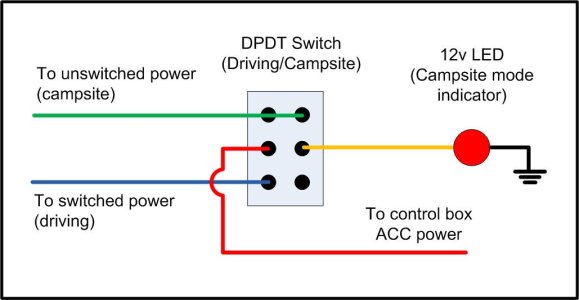
The first step is the main power connections and the connection to accessory power. The accessory power connection turns the system on when the ignition is turned on and needs to be connected to a switched power fuse in the vehicle's fuse panel. Since I'm doing this on the bench, I've used a clip lead to connect the Acc wire to the power supply.
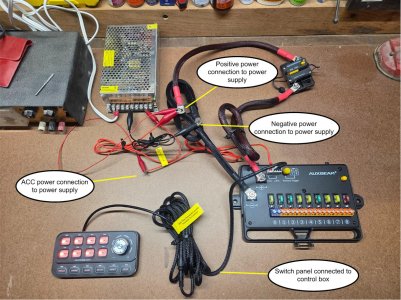
The main power connections are made directly to the battery with the supplied heavy-gauge cables and a 100-amp circuit breaker. These can be seen in the photo below, they're also connected to the bench power supply with clip leads for this bench test. The two main power connections in this photo are connected to the power supply (silver box) with clip leads, in the vehicle they would be connected directly to the battery. The ACC wire (smaller red wire) in this photo is also connected with a clip lead to the positive side of the power supply; in the vehicle it would be connected to a switched circuit in the vehicle's fuse panel with the supplied fuse tap. The final connection is from the switch panel to the control box. Four connections, that's all that's required to make the system operational, at this point all of the circuits in the control box can be activated by the switch panel. I know it's a bit of a jumble of wires in this photo but I think if you look closely you can follow the connections.
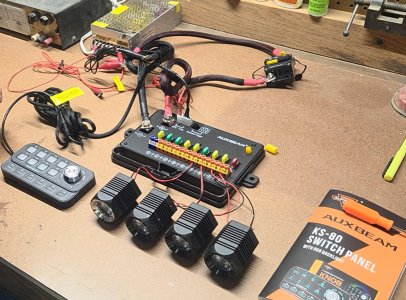
All that's needed at this point is to connect accessories to the control box. In this next photo I've connected four small LED light pods to circuits 5-8 of the control box. This is done by inserting the positive wire of the light into the red terminal of the desired circuit, the negative wire into the black terminal, and using the supplied screwdriver to tighten the connections.
Next: Special Features
What's in the box
The contents of the kit are very well thought out and almost everything you need is included (more on what else you might need later).
Left to right in the photo above:
- Switch labels and a comprehensive 26-page instruction book
- The control box and heavy power cables to connect the box to the battery
- Cables to connect the switch panel to the control box and other necessary connections
- The rotary knob switch panel, and above it various mounting hardware
- A 100-amp circuit breaker for the main power connection and a fuse tap for connecting to ACC power
- Mounting brackets for the control box and the switch panel, and double-sided adhesive if you want to stick the switch panel in place.
The switch panel has buttons for 8 circuits (and 160 stickers to label the buttons although none are installed in the photo below), a rotary control for adjusting brightness of the backlight, of the attached light accessories, color of the backlight, speed of the lighting effects and more.
The functions of the row of buttons at the bottom include:
- Toggle
- Strobe
- Chase
- Bright
- Backlit
- Mode
More on how these functions work later.
The control box actually has 9 circuits, 8 of which are controlled by the 8 switches on the control panel and one (circuit 0) automatically comes on when ACC power is applied to the control box (in other words, when the ignition is switched on). This serves as an additional source of switched power in the vehicle, eliminating the need to tap into the fuse panel if you have a need for switched power. As one example, the manual points out that circuit zero could be used to turn on daytime running lights.
Fuses are provided for each circuit, as well as an LED for each circuit, visible just below each fuse, which will light if a fuse blows.
Connections include large screw terminals for the main power and ground connections to the battery. ACC gets connected to switched power to turn on the system when the ignition is switched on. The 4-pin is where the switch panel connects and the external triggers are used to turn on circuits based on external events, like stepping on the brake. Finally, the small gold connection in the upper right where an antenna for the optional wireless remote control gets connected.
Connecting the system
I'm bench-testing the system and with all the wires exposed on the benchtop it should be clear how everything gets connected and although it may seem like a lot of wires, the wiring of the system is very straightforward (only 4 connections) so I'll try to make it clear how things get connected.
The first step is the main power connections and the connection to accessory power. The accessory power connection turns the system on when the ignition is turned on and needs to be connected to a switched power fuse in the vehicle's fuse panel. Since I'm doing this on the bench, I've used a clip lead to connect the Acc wire to the power supply.
The main power connections are made directly to the battery with the supplied heavy-gauge cables and a 100-amp circuit breaker. These can be seen in the photo below, they're also connected to the bench power supply with clip leads for this bench test. The two main power connections in this photo are connected to the power supply (silver box) with clip leads, in the vehicle they would be connected directly to the battery. The ACC wire (smaller red wire) in this photo is also connected with a clip lead to the positive side of the power supply; in the vehicle it would be connected to a switched circuit in the vehicle's fuse panel with the supplied fuse tap. The final connection is from the switch panel to the control box. Four connections, that's all that's required to make the system operational, at this point all of the circuits in the control box can be activated by the switch panel. I know it's a bit of a jumble of wires in this photo but I think if you look closely you can follow the connections.
All that's needed at this point is to connect accessories to the control box. In this next photo I've connected four small LED light pods to circuits 5-8 of the control box. This is done by inserting the positive wire of the light into the red terminal of the desired circuit, the negative wire into the black terminal, and using the supplied screwdriver to tighten the connections.
Next: Special Features