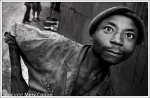
I like it, but it might pop more if you had used a shallower depth of field so the background was blurred out more. You could also do it in Post Processing and make her pop out more
I like it, but it might pop more if you had used a shallower depth of field so the background was blurred out more. You could also do it in Post Processing and make her pop out more
How do you do that in post? It was actually taken with an iPhone, so I didn't have exposure control, but you are definitely right about how she would pop more with a shallower DOF.
There's a final step that Pat didn't mention. Often the hard edge between the blurred and non-blurred portion looks very unnatural. You can soften this edge by using the History brush on reduced opacity and paint over the transition areas. It takes some experimentation to get the brush size and opacity just so, but in a minute or two you'll have it.
As for blurs, I think Gausian Blur provides the most Bokeh like blur.
This site uses cookies to help personalise content, tailor your experience and to keep you logged in if you register.
By continuing to use this site, you are consenting to our use of cookies.