Supertramp Flagship LT pop-up slide-in pickup camper

I think my power system has hit some protection state possibly from leaving the battery heaters on without shore power, but the camper has no power from the batteries and plugging into shore power doesn’t change anything. I also drove the truck for 40mins and I never got above 1.8a on one of the Orion chargers (the other seemed tension at 0a output, but I should get 100a charging in normal conditions). The batteries also do not show up in the Victron app.

I’m wondering if it’s a cell balancing issue, or some low power triggered fault state. Anyone have any ideas or run into this? I’m waiting to hear back from ST support.

I have the Victron 200ah batteries not the Battleborn ones.
 
Last edited:
I think my power system has hit some protection state possibly from leaving the battery heaters on without shore power, but the camper has no power from the batteries and plugging into shore power doesn’t change anything. I also drove the truck for 40mins and I never got above 1.8a on one of the Orion chargers (the other seemed tension at 0a output, but I should get 100a charging in normal conditions). The batteries also do not show up in the Victron app.

I’m wondering if it’s a cell balancing issue, or some low power triggered fault state. Anyone have any ideas or run into this? I’m waiting to hear back from ST support.

I have the Victron 200ah batteries not the Battleborn ones.

Battery heaters on with no incoming power source will drain the batteries below the protective "low voltage disconnect" where the external 'Victron Disconnects', on the load side, completing disconnect all loads from the battery. Interesting that the shore power charger nor DC/DC charger will input a charge. If that is the case, I suspect your batteries are below the low temp disconnect value (somewhere between 32F and 45F). The inbound 'Victron Disconnect' will not allow any current inbound if the battery communication says the battery cells are too cold (and possibly not allow charging if there is no communication because batteries are completely dead.

Which shore power charger do you have? If you have a Victron, in battery charger mode it may not output any current if it doesn't sense the battery (battery voltage is too load; aka dead). But there is a setting in the victron chargers where you can set it to be a 12v power supply. That way, it will put out current no matter what and that should allow you to get current to your busbars and there for the rest of your systems including the external heating pads and Truma Combi so you can turn on the heat. Just be mindful to not exceed the Victron power supply output power, but if only those two things are on, you should be fine. Don't run anything high power (like the actuators). You can then let the batteries heat up above freezing (around 40 or 45F I think) and then the Victron BMS should allow charging. You can also just use an electric heater inside the camper or, if you have Truma Combi plus, plug that into shore power and use Truma electric heat (you still need 12v power to the Truma for the fan, control pad, etc. to work). Might take 24hours for batteries to get above freezing you are using electric heater or Truma in the cabin vs running the heating pads which put heat into the batteries faster. Once it's taking a charge, set the Victron back to Charger mode rather than Power Supply mode.
 
Last edited:
This made me think of the "IMPORTANT - STC Battery Heater Information" newsletter STC emailed this winter. I dug it up and am pasting below.
-------------------------

Dear Supertramp Owners,

This is an important reminder regarding​

Battery Charging Temperature​

Lithium batteries should not be charged when they’re too cold. Charging at low temperatures can cause lithium plating inside the cells, which permanently reduces capacity and can even lead to internal damage. The Victron battery manual specifies the following temperature guidelines:

  • Storage: down to -49°F
  • Use/Discharge: down to -4°F
  • Charging: 41°F and above
The most common issue we’re seeing is when campers are stored in cold temperatures without using the battery heaters and then plugged in to charge—if the batteries are below the charging temperature threshold, their onboard BMS may refuse to accept a charge until they warm up.

Another issue that we’ve seen is owners using their battery heaters without shore power. In this instance, the battery heaters run the batteries down, lose power, and stop heating the batteries, ultimately allowing the batteries to drop under the charge temperature threshold and preventing proper charging.

Recommended Cold-Weather Storage Setup

If you're storing your camper in freezing temps, we strongly recommend:

  • Leave the camper plugged into shore power
  • Leave your Eco Plus system on and plugged in (will need separate extension cord)
  • Set the interior temperature to ~45–50°F (using your Truma on EL1 or EL2)
Using the Truma along with the battery heater pads is the best way to keep the batteries warm enough to charge properly, especially during extreme cold conditions.

If you cannot keep the camper plugged in

If shore power is not available and you are storing the camper long-term, we recommend:

  • Shut the entire system down for storage
    • Fully charge batteries
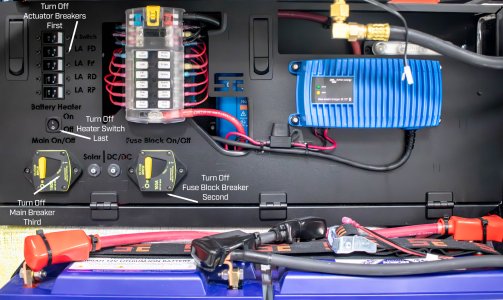
    • Shut down the entire electrical system, including the Main Breaker (Turn off Actuator Breakers first, then Fuse Block Breaker, then Main Breaker) See Photo Below:
STC 96a8ce22-5238-4e2d-9d68-d00b2fe6f51d.png


  • Check battery state of charge bi-monthly and keep batteries around 50–60%
    • If your batteries get below 50%, we recommend:
      • Bringing in a space heater from outside the camper (NOT powered by camper batteries)
      • Set it to ~45-50 Degrees Fahrenheit
      • Allow camper batteries to warm up over 2 days
      • Turn breakers back on and charge normally
  • When you’re ready to use the camper again in Spring, the procedure will be the same as above.

Quick Troubleshooting Note​

If your charger protection has tripped, we’ve found the system may require unplugging and replugging the charger cord into the camper in order to resume charging.

Charging Temp Setting Update​

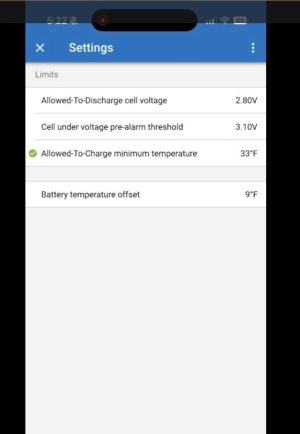
After some further R&D, we discovered that it is okay to adjust the battery charging temperature threshold from 41°F down to 33°F. Please see the attached video showing exactly how to change that value.


If you have any questions about cold weather storage or want us to help confirm your settings, feel free to reach out anytime—we’re happy to help!

Best,

Supertramp Campers Tech Support
720-648-3419

 
Expedition portal won't let me attach the .mov mentioned in STC newsletter on how to change the Victron battery charging threshold from 41F down to 33F, but the steps are:
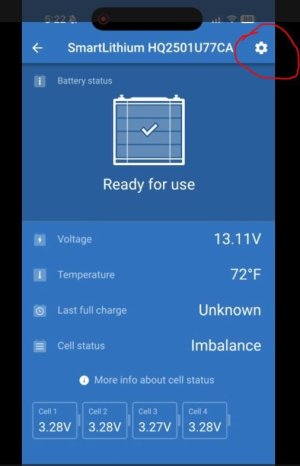
Open Victron app and go into each Victron smart lithium battery one at a time and repeat these steps.
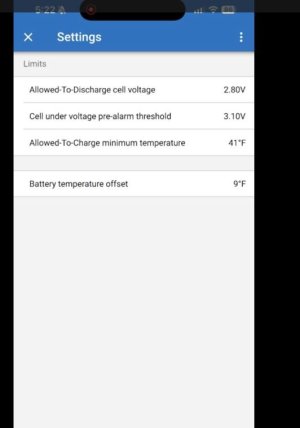
Tap the "settings" sprocket in upper right hand corner of app.
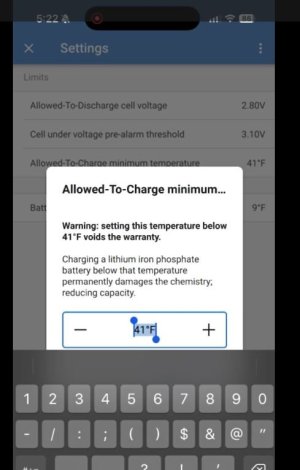
Select "Allowed to Charge Minimum Temperature" (default says 41F)
Change it for 33F (no colder). You may need to accept a warning, enter your pin, etc.

Typically this isn't needed and I think 41F should be a good default, but you can change it in a pinch per STCs above. I personally would leave it at 41F or maybe set between 36F - 38F at the coldest to account for temp sensor location and uneven temperature inside the battery (if the temp sensor is in a location that is slightly warmer and other battery cells are colder. Leaving battery charging threshold at 41F gives you more headroom for that than lowering it).

Screenshots:

vic04.JPG


vic02.JPG

vic03.JPG


vic01.JPG
 
Last edited:
Battery heaters on with no incoming power source will drain the batteries below the protective "low voltage disconnect" where the external 'Victron Disconnects', on the load side, completing disconnect all loads from the battery. Interesting that the shore power charger nor DC/DC charger will input a charge. If that is the case, I suspect your batteries are below the low temp disconnect value (somewhere between 32F and 45F). The inbound 'Victron Disconnect' will not allow any current inbound if the battery communication says the battery cells are too cold (and possibly not allow charging if there is no communication because batteries are completely dead.

Which shore power charger do you have? If you have a Victron, in battery charger mode it may not output any current if it doesn't sense the battery (battery voltage is too load; aka dead). But there is a setting in the victron chargers where you can set it to be a 12v power supply. That way, it will put out current no matter what and that should allow you to get current to your busbars and there for the rest of your systems including the external heating pads and Truma Combi so you can turn on the heat. Just be mindful to not exceed the Victron power supply output power, but if only those two things are on, you should be fine. Don't run anything high power (like the actuators). You can then let the batteries heat up above freezing (around 40 or 45F I think) and then the Victron BMS should allow charging. You can also just use an electric heater inside the camper. Might take 24hours for batteries to get above freezing you are using electric heater or Truma vs running the heating pads. Once it's taking a charge, set the Victron back to Charger mode rather than Power Supply mode.
It's currently around 60F here, so the batteries should be plenty warm, though it's possible one night in the past week or so it got below 41 if that was a tripping point or combined with the battery heater draw down. I have the Intelli-Power PD9360 converter/charger.

I drove for about 90 minutes today, and the Orion units showed "Absorbtion charge" for most of that time, but towards the end of the drive they changed to "Float". But output current never went above 1.80A, and fluctuated up and down constantly.

I have it plugged into shore power again, and I'm going to leave it that way overnight. I plan to drive it some tomorrow as well. And I do have the battery heater (and actuators) turned off now.
 
Not sure what is going on if your temp is good. It may be because they are so discharged. Some batteries only allow very little charging current if they are extremely discharged (just like they do as they approach full charge). It may be they just need very slow, but steady charging to get them over the 10% SOC mark and then they will accept faster charging. I think you have a good plan of leaving it on overnight.

To better determine current state of the battery and eliminate the possibility that one of the batteries is bad, when no charger nor load was connected and batteries were at rest, within the Victron app, what was the overall voltage listed? And what were the Cell 1, 2, 3, and 4 voltages? Same questions with the charger attached and charging (and I think the victron app will show current or amps going into battery).

You could also compare the app voltage to a multimeter reading (though that would give a reading for the entire battery bank since they are connected in parallel and would not give individual battery voltage).
 
Not sure what is going on if your temp is good. It may be because they are so discharged. Some batteries only allow very little charging current if they are extremely discharged (just like they do as they approach full charge). It may be they just need very slow, but steady charging to get them over the 10% SOC mark and then they will accept faster charging. I think you have a good plan of leaving it on overnight.

To better determine current state of the battery and eliminate the possibility that one of the batteries is bad, when no charger nor load was connected and batteries were at rest, within the Victron app, what was the overall voltage listed? And what were the Cell 1, 2, 3, and 4 voltages? Same questions with the charger attached and charging (and I think the victron app will show current or amps going into battery).

You could also compare the app voltage to a multimeter reading (though that would give a reading for the entire battery bank since they are connected in parallel and would not give individual battery voltage).
The only items showing in the Victron app are one of the BatteryProtects, both Orions, and both SmartSolars. Everything else is not showing (2nd BatteryProtect, SmartBMV, SmartLithiums). I should also note, in the app the BatteryProtect shows "Load output state: Disabled by REMOTE".

The multimeter is a good call, I'll pull that out tomorrow. Do you happen to know where the smallBMS is located? I haven't been able to find it, but I'm probably overlooking it.
 
Check out this post. https://forum.expeditionportal.com/...up-slide-in-pickup-camper.239844/post-3210809
If you scroll down through the pics, with the front electronics cabinet panel tipped forward, it shows the location of the two Battery Protect BP-100 (up high in the cabinet) and the Victron SmallBMS (down low). But I don't know if that is where STC is locating them nowadays as that was in a Flagship HT and the very first one they'd set up with Victron batteries, smallBMS and Battery Protects.
At least you can see, in that link, what each component looks like. You can also follow the black communication cables coming out of the batteries.
 
@roamie sounds like you’re in a warmer climate possibly. Do you have a cord made up for plugging in the Truma to shore power? That would also be a good insurance policy. Curious to hear if charging overnight helps your issues.
 
@roamie sounds like you’re in a warmer climate possibly. Do you have a cord made up for plugging in the Truma to shore power? That would also be a good insurance policy. Curious to hear if charging overnight helps your issues.
I bought an adapter plug for connecting it to shore power that Supertramp recommended, but I can't recall where I put it. It's warm enough now that it's not needed, but it's something I'll look at going into next winter period.

I left it on shore power overnight, and the only real difference in things is that now the red "Temp or OVP" light on the smallBMS is on. Previously there were no indicator lights lit on it. I drove it around some more today, and I'm just leaving it on shore power now.

I did get the multimeter out, but it made me even more confused to be honest. All 4 batteries reported 2.94V. I measured from the positive bus bar to the shunt, and that also was at 2.94V. The BatteryProtect measured 11.31V. But the Victron App shows the BatteryProtect battery voltage at 13.49.

I think I'll have to wait to hear back from Supertramp now. I wish they had weekend support.
 
I bought an adapter plug for connecting it to shore power that Supertramp recommended, but I can't recall where I put it. It's warm enough now that it's not needed, but it's something I'll look at going into next winter period.

For those not familiar with the optional "plus" version of the Truma Combi, it contains an electric heating element that can be powered by 120v shore power, but it receives its own exterior wall plug separate from the camper's battery charger plug. That Combi Plus plug, on the camper exterior, is a NEMA 5-20P (P stands for plug) rather than a NEMA 5-15P like the battery charger plug. NEMA 5-20 plugs have one prong turned sideways, rather than both prongs being parallel, and indicates it should be plugged into a 20amp circuit rather than 15 amp circuit. You can use an adapter with a NEMA 5-20R (R is for receptacle; aka outlet) and ensure you only plug into a 20amp 120v outlet if you plan to use the full potential (highest setting) of the electric heating element. This is because the combi plus can draw up to 1,700 watts (14.2amps on 120v) and best practice is to limit continuous draw to 80% of a circuits rating, which would be a max continuous of 16 amps on a 20amp circuit. On a 15amp circuit, max continuious draw should be limited to 12amps (1,440 watts).

There is the option to run the Combi plus on 'Operating Level 1' which draws a max of 850 watts (7.1amps on 120v). It is perfectly fine to draw a continuous 7.1 amps from a 15amp circuit since it is well below the 80% rating which is 12amps.

Whether you plug the combi into a 20amp circuit or, use and adapter to plug into a 15amp circuit, the caveat on any circuit is there could be other loads on the same circuit. For example, if your camper is plugged into an outlet in your garage and there is another outlet on the same circuit with a garage fridge plugged into it, or someone was to plug in a power tool or heater to the same circuit, the circuit may experience sustained draw over the 80% circuit rating level or simply be overloaded and trip the breaker or blow a fuse in the service panel.

...I did get the multimeter out, but it made me even more confused to be honest. All 4 batteries reported 2.94V. I measured from the positive bus bar to the shunt, and that also was at 2.94V. The BatteryProtect measured 11.31V. But the Victron App shows the BatteryProtect battery voltage at 13.49.

From your earlier post, it makes sense that the SmartBatteries, SmartBMS and outbound (load) Battery Protect are not showing up if your battery bank is dead. The inbound (charger) Battery Protect is likely showing because it is getting powered because your charger is plugged in. If you unplug all charge sources, it's likely to eventually disappear from your Victron app menu as well. That seems like a big hint.
I don't think charge is getting to your batteries at all.

You are testing voltage with the charger turned on, correct? That is a good way to confirm where the charger voltage is passing and where it is not. You mention testing at the Battery Protect. There are two of those, but because you had voltage, it sounds like you tested on the charger side if the Inbound Battery Protect. The other Battery Protect will be the Outbound Battery Protect (Load going out of the battery). One battery protect turns off to prevent outbound current from the batteries and the other turns off to halt inbound current to the battery (from solar, shore power charger and DC/DC charger). In a situation where the charger is on an Inbound Battery Connect is blocking current to the battery, you'd have bulk or float charger voltage (12v+) on the main positive busbar (assuming the charger is connected directly to the busbar, charger is on, and any breaker or fuse on the outbound charger conductors are flowing). You'd also have charger voltage right up to the charger side of the Inbound Battery Protect, but if it was triggered to shut off, voltage/current would not be present on the battery side. With dead battery bank, your BMS isn't able to tell the Battery Protects what to do so I imagine they err on the side of caution and shut off current unless the smartBMS instructs them otherwise.

I think you need to apply 12v power directly to the battery terminals to wake up the batteries and external smartBMS so it can correctly give instructions to the battery protects. To do so, you'll need a battery charger that has a wake-up function (most victrons, but also many other LiFePO4 battery chargers), or a 12v power supply, or any 12v battery (use smaller gauge wire to limit current in-rush. Don't use Auto Jumper Cables, for example. Just some 16 to 12 gauge wire will limit the in-rush. But you may still get a spark so eye protection, etc.)
Connect any of those sources directly to the Victron smartLithium battery terminals which will energize the smallBMS. It won't take much current but might take a little bit of time for everything to power up and start talking. Once they wake up, the smartLithium, smartBMS and both battery protects should be available in your Victron app menu. Just leave the shore power charger plugged in as it will immediately start charging once the batteries wake up.

Another thing to check, if you have not already, is that all communication cables are firmly seated at all connectors; Connectors between all your batteries and connectors between batteries and smallBMS) and then also check the cables running from the smallBMS to both Battery Protects). Lack of communication may not allow the inbound Battery Protect to allow current to flow to battery from any of your charge sources. But I think your connections are likely fine and your batteries just need to get a wake up with a 12v source directly to the terminals. I should have originally recommended you do that as it's the most likely issue, but didn't think to suggest it until I heard more and thought through it.

 
Last edited:
I talked with SuperTramp today, and they reached out to Victron to confirm things as well. I fortunately purchased the Victron IP65 10A charger which arrived this morning (thanks @Chadx for the idea, everyone should probably have one of these handy). The basic process is:
  • Disconnect the battery for both power connections as well as BMS connections
  • Put the charger in Li-ion mode and set it at 3A
  • Connect to the battery and let it charge
  • Repeat one at a time for each battery
  • Reconnect the batteries to power and BMS
I was expecting it to take quite a while for each battery to recharge, but so far it's gone from 2.9V to 11V in about 30-40 mins at that 3A setting. We'll see how long it takes to level off at ~14.1V which is full charge, I'm thinking it may slow down as it gets closer to that point. Also, somewhere around 9v the battery bluetooth re-enabled and showed back up in the app.

All signs so far are the system did what it was supposed to do to protect against any damage. I'll report back once everything is completed. As a side note, this experience has forced me to learn the power system in far better detail than I originally did, which I'm glad to now understand better.
 
Just submitted a request to ST to upgrade my camper with a few of the new options.

100aH charging (dual 50’s)
Guzzle H2O purifier and faucet
External solar port
Lockable water fill
Dimmer switch

These are all non negotiable as far as I’m concerned….. I love my ST but this fixes any and all of the shortcomings it has. Price from ST isn’t cheap but I have to be out there for my actuator upgrade anyway. Once this is done my camper will be north of $90k but should be perfect…. I can’t believe that’s the price but I guess you can’t put a price on comfort.
 
Just submitted a request to ST to upgrade my camper with a few of the new options.

100aH charging (dual 50’s)
Guzzle H2O purifier and faucet
External solar port
Lockable water fill
Dimmer switch

These are all non negotiable as far as I’m concerned….. I love my ST but this fixes any and all of the shortcomings it has. Price from ST isn’t cheap but I have to be out there for my actuator upgrade anyway. Once this is done my camper will be north of $90k but should be perfect…. I can’t believe that’s the price but I guess you can’t put a price on comfort.

I 100% agree with all those upgrades plus, on our list, A/C and induction cooktop. A/C is the only thing that cannot be retrofitted so still plotting to order a new Flagship LT in spring of 2027, with A/C and all the other upgrades we want, and sell our current Flagship LT. Wish list and still running the numbers and saving up to see if we can make it happen.

I don't recall, does your Superduty have Pro Power Onboard? Just mentioning it because you can run the two DC chargers off of the 24v alternator if so. You just need the Victron XS 1400 DC charger rather than the Victron XS 50 DC charger. The good thing is the XS 1400 can be programmed to input 12v or 24v and output 12v or 24v or any combination, so even if you have a 24v alternator failure, in the field you just move the conductors to your 12v battery, reprogram the XS 1400 for 12v input rather than 24v input, and good to go.

This makes use of your 24v alternator that otherwise goes unused except when you use the pro power onboard inverter. I'll be having my DC chargers run off the 24v alternator.
 

Forum statistics

Threads
191,143
Messages
2,933,557
Members
235,080
Latest member
NorthCaptiva
Top